
Handbuch
Manual
Dokumentation
Documentation
Wie das System aufgebaut ist und wie die tägliche Arbeit damit abläuft.
How the system is put together and what day-to-day work with it looks like.
Begriffe
Concepts
Das System kennt zwei Arten von Artikeln. Beide liegen in derselben Liste und unterscheiden sich darin, wie sie eingeordnet werden.
The system knows two kinds of item. Both live in the same list and differ in how they are filed.
| Component | Component | Ein elektronisches Bauteil. Wird einer Bibliothek zugeordnet
(etwa Resistor_0603) und trägt Parameter wie Wert, Toleranz, Leistung,
Spannung oder Dielektrikum. Diese Artikel gehen nach Altium. |
An electronic part. Filed under a library (such as
Resistor_0603) and carrying parameters like value, tolerance, power,
voltage or dielectric. These are the items that go to Altium. |
| Product | Product | Alles andere: fertige Baugruppen, Gehäuse, Kabel, Zukaufteile. Wird in einen Kategoriebaum einsortiert. | Everything else: finished assemblies, enclosures, cables, bought-in parts. Filed into a category tree. |
| Projekt | Project | Klammer über eine Entwicklung, mit Projektnummer und beliebig vielen Stücklisten. | The bracket around one development effort, with a project number and any number of BOMs. |
| Stückliste (BOM) | BOM | Liste aus Artikeln mit Mengen, gehört zu einem Projekt, hat Version und Status. | A list of items with quantities, belonging to a project, carrying a version and a status. |
Artikel anlegen und bearbeiten
Creating and editing items
Über Add Item rechts oben wählen Sie zuerst, ob ein Bauteil oder ein Produkt entsteht. Danach füllen Sie MPN, Beschreibung, Hersteller, Bestand und Preis aus. Die Artikelnummer vergibt das System selbst — sie ist die Nummer, die später auf dem Etikett und im QR-Code steht.
Use Add Item in the top right and first choose whether you are creating a component or a product. Then fill in MPN, description, manufacturer, stock and price. The item number is assigned by the system — it is the number that later appears on the label and inside the QR code.
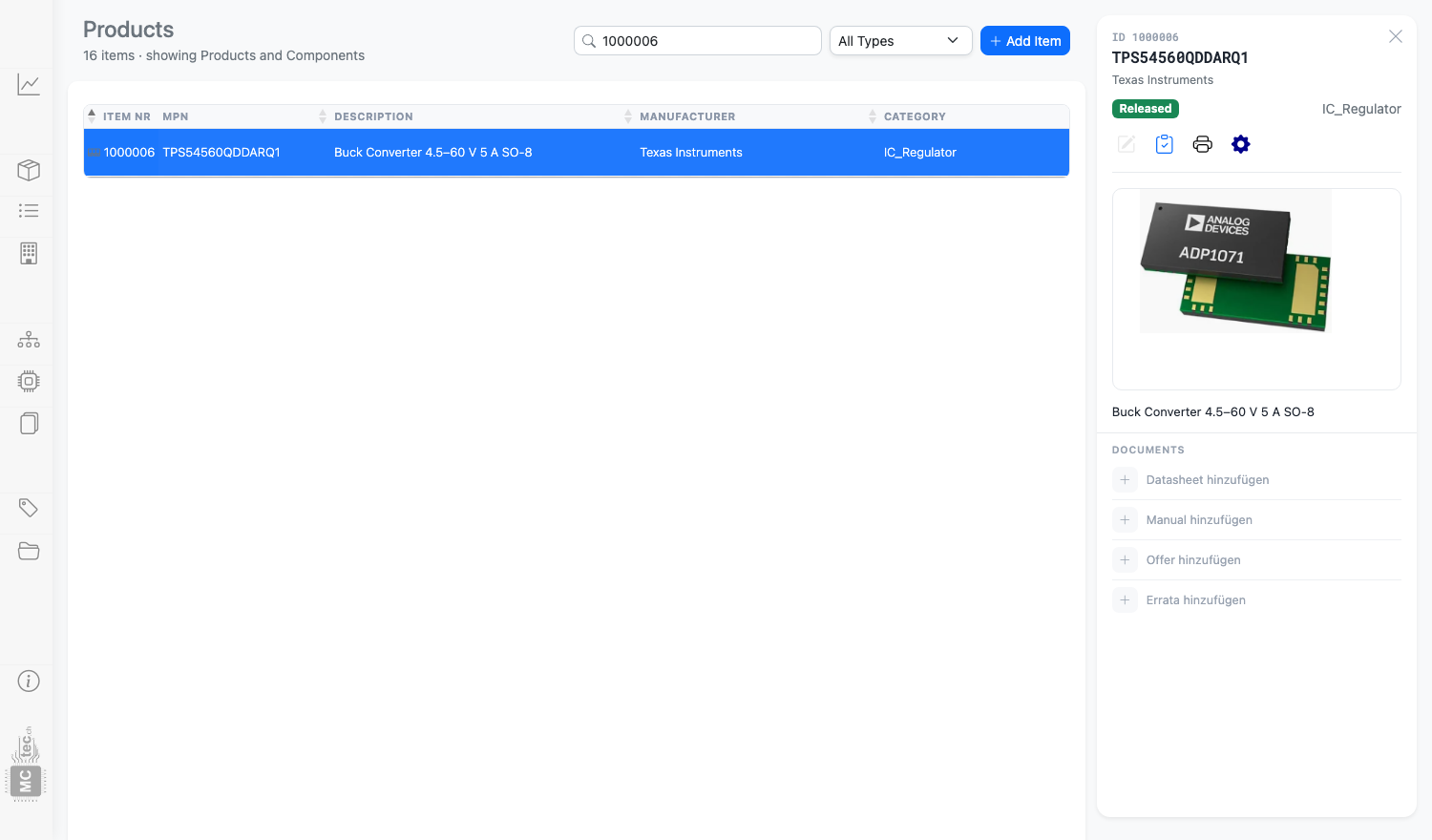
Ein Klick auf eine Zeile öffnet rechts die Detailkarte. Dort finden Sie Bild, Dokumente und die Schaltflächen zum Bearbeiten, Drucken und Hinzufügen zur Stückliste.
Clicking a row opens the detail card on the right. It holds the image, the documents and the buttons for editing, printing and adding to a BOM.
Kategorien und Bibliotheken
Categories and libraries
Produkte werden in einen Kategoriebaum einsortiert, den Sie unter Categories pflegen. Die Reihenfolge und die Verschachtelung ändern Sie dort per Ziehen mit der Maus; gespeichert wird der ganze Baum auf einmal. Namen müssen eindeutig sein.
Products are filed into a category tree that you maintain under Categories. Order and nesting are changed there by dragging; the whole tree is saved in one go. Names must be unique.
Bauteile dagegen gehören zu einer Bibliothek. Die Bibliothek entspricht dem, was in
Altium später als Bauteilklasse erscheint — Resistor_0402,
Capacitor_0603, IC_Regulator und so weiter.
Components, by contrast, belong to a library. The library corresponds to what later shows
up in Altium as the part class — Resistor_0402,
Capacitor_0603, IC_Regulator and so on.
Dokumente
Documents
Zu jedem Artikel lassen sich vier Arten von PDF hinterlegen: Datenblatt, Handbuch, Offerte und Errata. In der Detailkarte steht pro Art eine Zeile mit der neuesten Version; ältere Fassungen rücken eingerückt darunter und bleiben abrufbar.
Four kinds of PDF can be attached to any item: datasheet, manual, offer and errata. The detail card shows one row per kind with the newest version; older ones sit indented below and stay available.
Das Pluszeichen in der Zeile öffnet den Upload-Dialog. Dort ziehen Sie die Datei auf die Fläche oder wählen sie aus; rechts sehen Sie die bereits vorhandenen Versionen und können einzelne davon löschen. Es sind beliebig viele Versionen pro Art möglich.
The plus sign in the row opens the upload dialog. Drop the file onto the area or pick it from disk; on the right you see the versions already stored and can delete individual ones. Any number of versions per kind is possible.
file/ und werden über eine laufende Nummer referenziert.
Beim Herunterladen setzt das System daraus einen sprechenden Dateinamen zusammen, zum
Beispiel Datasheet_TexasInstruments_TPS54560_1000006_V2.pdf.
file/ and are referenced by a running number. On download
the system assembles a readable file name from the part data, for example
Datasheet_TexasInstruments_TPS54560_1000006_V2.pdf.
Freigabe-Ablauf
Release workflow
Jeder Artikel trägt einen Freigabestatus, der in der Liste als farbiges Abzeichen erscheint:
Every item carries a release state, shown in the list as a coloured badge:
| Created | Neu angelegt, noch nicht geprüft. Darf frei geändert werden. | Newly created, not yet reviewed. Free to change. |
| Reviewed | Geprüft — etwa weil Footprint und Symbol stehen — aber noch nicht freigegeben. | Reviewed — typically once footprint and symbol are done — but not yet released. |
| Released | Freigegeben für den produktiven Einsatz und für Altium. | Released for production use and for Altium. |
| Issue Open | Gesperrt. Beim Setzen wird eine Begründung erfasst, die am Datensatz hängen bleibt. | Blocked. Setting it asks for a reason, which stays attached to the record. |
| Obsolete | Abgekündigt. In neuen Entwürfen nicht mehr verwenden. | Discontinued. Do not use it in new designs. |
Jeder Wechsel wird mit Zeitpunkt und Benutzer protokolliert, sodass später nachvollziehbar bleibt, wer wann was freigegeben hat. Die Startseite des Systems zählt die Bauteile je Status, sodass auf einen Blick sichtbar ist, wie viele noch offen sind.
Every change is logged with a timestamp and the user, so it stays traceable who released what and when. The system's start page counts parts per state, so you can see at a glance how many are still open.
Issue Open oder Obsolete gesetzt wurde.
Issue Open or Obsolete.
Mit Stücklisten arbeiten
Working with BOMs
Unter Projects legen Sie zuerst ein Projekt an, darin dann eine oder mehrere Stücklisten. Zum Befüllen setzen Sie eine Stückliste aktiv: Von da an bleibt sie in einer Leiste am oberen Rand sichtbar, mit der Anzahl der Positionen.
Under Projects you first create a project and then one or more BOMs inside it. To fill one, mark it active: from then on it stays visible in a bar along the top, together with its item count.
Jetzt arbeiten Sie wie in einem Webshop: In der Artikelliste suchen, auf das Warenkorb- Symbol in der Detailkarte klicken, Menge eingeben. Artikel, die bereits in der aktiven Stückliste liegen, sind in der Liste markiert — Sie sehen also auf einen Blick, was noch fehlt.
Now you work as you would in a web shop: search the parts list, click the cart icon on the detail card, enter a quantity. Items already in the active BOM are marked in the list, so you can see at a glance what is still missing.
Versionen und Ausgabe
Versions and output
Eine Stückliste trägt eine Version und einen Status. Ist eine Fassung gebaut und ausgeliefert, lassen Sie sie stehen und legen die nächste Version daneben an. Für Fertigung und Einkauf gibt es die Ausgabe als PDF und als CSV, wahlweise mit einem prozentualen Aufschlag auf die Preise.
A BOM carries a version and a status. Once a revision has been built and shipped, leave it as it is and start the next version alongside. For production and purchasing there is output as PDF and as CSV, optionally with a percentage markup on the prices.
Etiketten drucken
Printing labels
Das Druckersymbol in der Detailkarte erzeugt ein Etikett im Format 62 × 33 mm. Darauf stehen die Artikelnummer, ein QR-Code darauf und je nach Artikelart unterschiedliche Angaben:
The printer icon on the detail card produces a 62 × 33 mm label. It carries the item number, a QR code pointing at it, and different details depending on the kind of item:
- Produkte und Bauteile mit MPN: Hersteller und MPN
- Widerstände: Wert, Toleranz, Leistung und Spannung
- Kondensatoren: Wert, Toleranz, Spannung und Dielektrikum
- Products and parts that have an MPN: manufacturer and MPN
- Resistors: value, tolerance, power and voltage
- Capacitors: value, tolerance, voltage and dielectric
So tragen auch Allerweltsbauteile ohne eigene Herstellernummer eine sinnvolle
Beschriftung. Ob ein PDF erscheint oder direkt gedruckt wird, steuert die Einstellung
PRINT_METHOD — siehe Installation.
That way even commodity parts without a manufacturer number get a meaningful label.
Whether a PDF appears or the label is printed directly is governed by the
PRINT_METHOD setting — see Installation.
Rollen und Rechte
Roles and permissions
| Rolle | Role | Darf | Can |
|---|---|---|---|
| Administrator | Alles, dazu Benutzerverwaltung, Einstellungen, Backup und das Zurücksetzen des Systems | Everything, plus user management, settings, backups and resetting the system | |
| User | Artikel, Dokumente, Kategorien, Projekte und Stücklisten anlegen und ändern | Create and change items, documents, categories, projects and BOMs | |
| Guest | Alles ansehen und Dokumente herunterladen, aber nichts ändern | View everything and download documents, but change nothing |
Tastatur
Keyboard
In den Listen lässt sich mit den Pfeiltasten nach oben und unten durch die Zeilen gehen; die Detailkarte rechts folgt der Auswahl. Das Suchfeld ist der schnellste Weg zu einem bestimmten Artikel — es durchsucht Artikelnummer, MPN und Beschreibung gleichzeitig.
In the lists, the up and down arrow keys move through the rows and the detail card on the right follows the selection. The search box is the quickest route to a specific item — it searches item number, MPN and description at once.
Aufbau für Entwickler
Structure for developers
Die Anwendung ist bewusst einfach gehalten: prozedurales PHP, eine zentrale Schnittstelle, kein Framework.
The application is deliberately plain: procedural PHP, one central endpoint, no framework.
config/      nur installationsabhängig: Zugangsdaten, Einstellungen, Logos
system/      Anwendung
  api.php      zentrale Schnittstelle, verteilt auf handlers/
  handlers/    ein Handler je Themengebiet
  includes/    gemeinsame Funktionen, Kopf- und Fusszeile, Schema
  assets/      Stylesheets und JavaScript
plugins/     ProjectManager, AltiumIntegration, LabelPrinter
file/        hochgeladene Dokumente und Bilder
tests/       PHPUnit: Unit- und Integrationstests
Alle schreibenden Zugriffe laufen über system/api.php und sind mit einem
CSRF-Token abgesichert. Die Tests arbeiten gegen eine getrennte Datenbank, nie gegen die
produktive.
Every write goes through system/api.php and is protected by a CSRF token. The
tests run against a separate database, never the production one.
config/ enthält ausschliesslich installationsabhängige Dateien.
Genau deshalb lässt sich ein Update einspielen, indem alles ausser diesem Ordner und
file/ ersetzt wird.
config/ folder holds nothing but installation-specific files. That is
precisely what makes an update as simple as replacing everything except that folder and
file/.